
The Cockpit in My Lap: A Long-Haul Love Letter to the Honeycomb Echo Aviation Controller
Introduction: The Flight Simmer’s Great Dilemma
For years, I lived in a state of perpetual, agonizing clutter. Like many dedicated flight simulation enthusiasts, my desk was less a functional workspace and more a precarious stack of aviation hardware. There was the yoke, bolted precariously to the front; the rudder pedals, permanently scuffing the carpet under my desk; and the modular throttle quadrant, always threatening to slide off during a critical go-around. My setup, while immersive, was an enormous, expensive, and time-consuming commitment. It was a space designed solely for the 1% of my life spent simulating a flight from Anchorage to Paris, making it utterly impractical for the other 99%.
I often thought: there has to be a better way. Why couldn’t I just settle into my favorite armchair, fire up Microsoft Flight Simulator on my PC, and enjoy a casual, high-fidelity flight without dedicating an entire corner of my apartment to the endeavor?
When Honeycomb Aeronautical, a company I already respected for their high-quality Alpha Yoke and Bravo Throttle Quadrant, announced the Echo Aviation Controller for a price point around US$149.99, I was intrigued, but also deeply skeptical. A “fully fledged simulation experience” crammed into a standard gamepad form factor? That sounded like a marketing fantasy, a promise destined to deliver a compromised, frustrating, jack-of-all-trades-master-of-none controller.
Yet, after spending the last few weeks putting the Echo through its paces—flying everything from single-engine trainers to complex, four-lever regional jets—I have been forced to eat my own skepticism. The Echo Aviation Controller isn’t just a convenient controller; it is a revolutionary piece of design that genuinely delivers on its core promise: no compromise control in a single compact controller. This is my personal experience, and why this arcane-looking instrument might just be the best flight sim peripheral released in years.
Part 1: Unboxing the “Arcane Instrument”
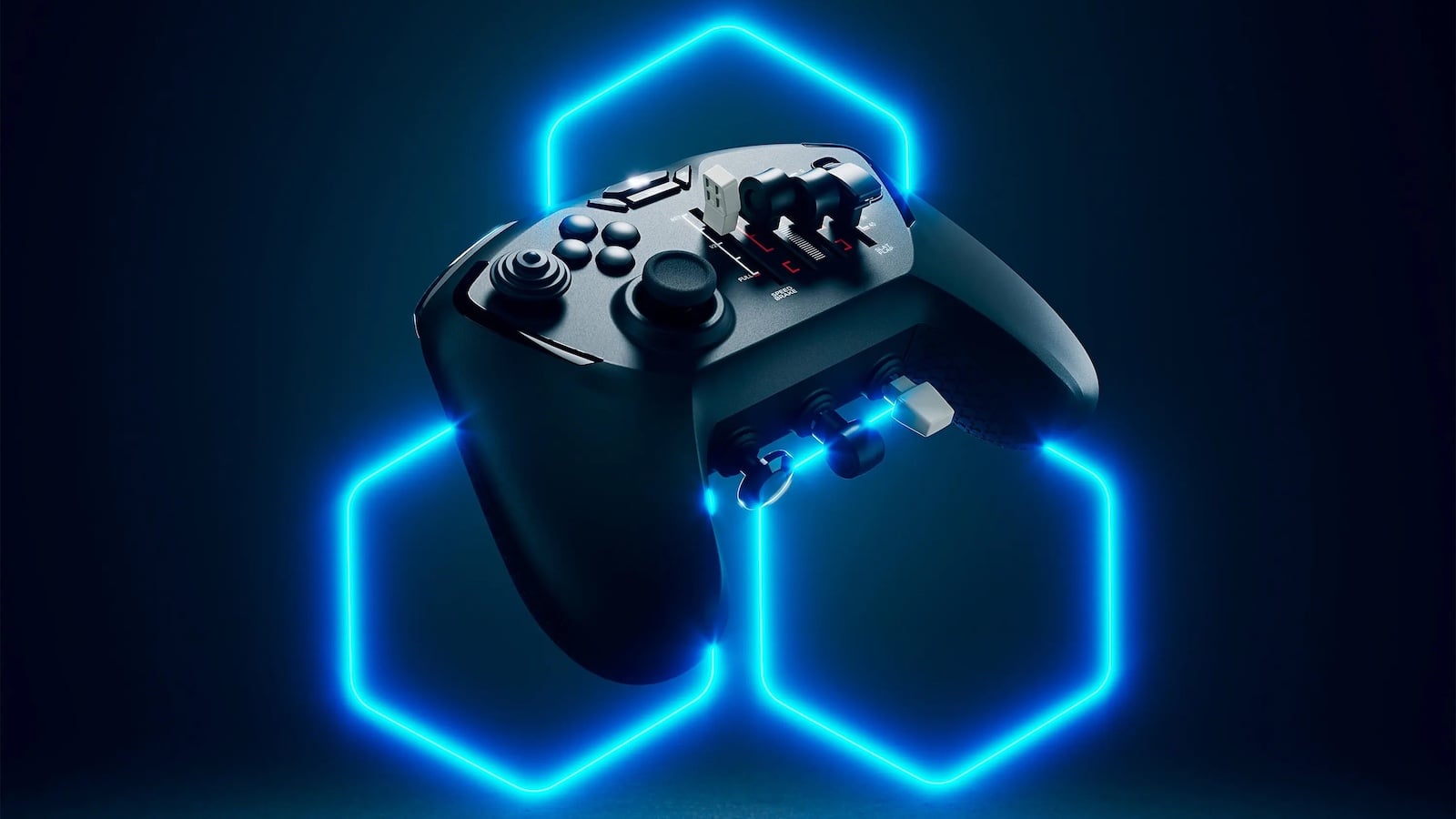
The box that arrived was surprisingly small. Having previously wrestled with Honeycomb’s hefty yoke and quadrant, I expected something chunkier. What I pulled out of the packaging was a device that immediately sparked my curiosity. It looks, to be frank, like an unholy marriage between an Xbox controller and a fighter jet’s control panel. The PC Gamer writer who called it an “arcane instrument” was spot on—it’s covered in improbably placed knobs, dials, and levers. It manages to feel both familiar (the grip shape, the D-pad, the thumbstick on the left) and utterly alien (the entire right side).
First Impressions on Build Quality:
Honeycomb has maintained its reputation for robust construction. While the Echo is lightweight—perfect for couch use—it doesn’t feel cheap. The plastic shell is solid, and the key components have a satisfying heft and resistance.
-
The Levers: The four throttle levers, stacked neatly on the right side, glide with a smooth, consistent friction. Crucially, they feel independent, giving you a tactile reference for fine adjustment without looking.
-
The Trim Wheel: This was the first thing I reached for. It’s a dedicated, physically textured thumbwheel, and it offers the kind of satisfying, continuous resistance that makes micro-adjustments intuitive. It feels like a miniature version of the wheel on my full Bravo quadrant, which is a massive compliment.
-
Connectivity and Portability: Setup was blissfully simple: plug in the USB-C cable or the low-latency wireless dongle, and Windows immediately recognized it. The promise of up to 15 hours of battery life is key to that “long-haul flight” experience Honeycomb advertised—no mid-flight scramble for a charging cable.
The biggest revelation on unboxing was realizing what Honeycomb had truly accomplished at the $150 price point. To buy the separate components—a decent flight stick, a dedicated trim wheel, a multi-lever throttle quadrant, and entry-level rudder pedals—you are easily looking at a spend of $400 to $600. The Echo combines all the essential functionality of these devices into one unit, making it an unprecedented value proposition for anyone entering the sim world, or, like me, anyone wanting to simplify their setup.
Part 2: The Design Revolution—A Closer Look at the Controls
The genius of the Echo lies not just in its compactness, but in the intelligent, uncompromised way it integrates high-fidelity aviation controls into a handheld form. This is where the device truly shines as a personal flight tool.
The Pitch, Roll, and Yaw Triad
Honeycomb tackled the most crucial flight axes by separating them cleverly:
-
Pitch and Roll (The Hall-Effect Stick): The left-side stick, replacing the traditional right thumbstick on a console controller, is the primary control for elevator and ailerons. It uses a 16-bit Hall-Effect sensor, a technical detail that translates directly to feel. Hall-Effect sticks use magnets rather than physical contacts, virtually eliminating drift and offering superb linearity and precision. This is not some cheap, off-the-shelf gaming thumbstick. During fine maneuvering, like lining up on final approach, the tiny movements of the stick translated perfectly to the aircraft, giving me the confidence I usually only associate with my full yoke.
-
Yaw (The Rudder Paddles): This is the device’s most ingenious design element. Located on the back, they are a pair of trigger-like paddles—one for the left rudder, one for the right. What the Russian review on iXBT highlighted is crucial: they operate in “counterphase, imitating real rudder pedals.” When you squeeze one paddle, it provides yaw in that direction. This feels surprisingly natural. It’s not a perfect analog for foot pedals, but for quick, precise rudder input—essential for keeping an aircraft centered on the runway during crosswinds, or for minor corrections during taxiing—it works brilliantly and saves $100+ on dedicated foot pedals, not to mention the precious floor space.
The Dedicated Throttle Quadrant (x4!)
The four integrated, independently assignable levers are the heart of the Echo’s professional-grade capability. This is what separates the Echo from every other “gamepad” on the market. Most standard sim-friendly controllers max out at two or maybe three axes. The Echo offers four, meaning I can flawlessly simulate the engine controls for:
-
Single-Engine Props (Cessna 172): Throttle, Propeller (RPM), and Mixture. Perfect.
-
Twin-Engine Piston/Turboprops (King Air or TBM): Throttle 1, Throttle 2, Propeller, and Condition (or Flaps).
The ability to switch from a simple Cessna 152 to a complex Diamond DA62 without having to re-map or change my hardware setup is a massive quality-of-life improvement. The tactile feedback of those four levers is phenomenal, giving the satisfying feeling of moving physical engine controls, a feeling totally absent from sliding the throttle on a standard flight stick.
The Essential Add-ons: Trim, Flaps, and Gear
Finally, the dedicated, physical switches for essential systems are what make the Echo a true flight controller, not just a game pad.
-
The Trim Wheel: I cannot stress enough how vital a dedicated trim wheel is to realistic simulation. Trim relieves aerodynamic pressures and allows for hands-off flight. Using the thumbwheel on the Echo is infinitely more effective than a simple rocker button (which is often too coarse) or constantly holding down a button on a hat switch. It allows you to dial in pitch with micro-precision for stable cruise, descent, and approach, freeing up your left hand for radio or navigation tasks.
-
Physical Levers: The dedicated levers for Flaps, Landing Gear, and Parking Brake are simple click switches, but their physical location—instantly recognizable by feel—eliminates frantic searching for keyboard shortcuts or menu clicks. When you’re 500 feet above the runway and realize you forgot the gear, the muscle memory of reaching for that specific lever on the Echo is a lifesaver.
Part 3: Taking to the Skies—My Personal Flight Test
My true test of the Honeycomb Echo wasn’t a quick circuit; it was a challenging, simulated long-haul flight across a few high-altitude mountain ranges, specifically, a hop in the magnificent TBM 930 turboprop. This aircraft demands constant attention to power, propeller pitch, and trim—exactly where the Echo should prove its worth, or fall apart.
1. Pre-Flight and Taxiing: The Simmer on the Sofa
Sinking into my armchair, I rested the Echo comfortably on my lap. The weight distribution felt balanced—it wasn’t too heavy on one side, despite the packed-in hardware.
-
Setting Power: Using the four levers, I set the two primary levers for Power and Propeller and used the third for the Condition lever (High Idle). Having them right there, perfectly positioned for my right hand, felt immediately natural.
-
Brake and Gear: A quick flip of the parking brake switch (located near the shoulder button) and a positive click of the gear lever into the ‘up’ position for pre-flight check.
-
Rudder Control: The greatest surprise was taxiing. Using the rudder paddles on the back felt far more responsive and controllable than I expected. Instead of the jerky movements a thumbstick can sometimes provide for yaw, the paddles allowed for smooth, proportional deflection of the rudder/nose wheel. Navigating the complex taxiways of a busy airport like Toronto (CYYZ) was surprisingly intuitive, allowing me to focus on ground speed using the throttle levers.
2. Takeoff and Climb: Precision is Key
The moment of truth: pushing the throttle forward. I smoothly advanced the dedicated Power lever.
-
V1, Rotate: Using the precision Hall-Effect stick, rotation was smooth and gradual—no over-controlling, which is a common hazard with sensitive controllers. The 16-bit resolution truly shines here, translating the delicate movements of my thumb into perfect pitch and roll input.
-
Flaps and Gear: After lift-off, retracting the gear and flaps felt like a proper, defined action thanks to the physical levers. The satisfying clunk of the virtual controls matched the click of the Echo’s switches.
-
Trimming for Climb: As the aircraft accelerated, I engaged the vertical speed for the climb. The TBM demands constant pitch attention. Using the trim wheel, I could effortlessly “dial out” the nose-up force, setting the aircraft perfectly on its climb profile without having to hold the stick. This tactile feedback is the single biggest immersion factor the Echo introduces over a standard gamepad.
3. Cruise and Descent: Long-Haul Comfort
During the cruise phase, the Echo’s compact size became a virtue. It could rest on the arm of my chair or be held loosely while I managed the FMS (Flight Management System). When the autopilot was engaged, the Echo effectively became a sophisticated control panel.
-
Engine Management: Flying the twin-turboprop meant constantly monitoring the power and propeller levers. The independent nature of the four sliders was invaluable for syncing the engines and managing fuel flow. It gave me a degree of control usually reserved for my massive desktop quadrant.
-
Camera and Checklist: The dedicated buttons on the top edge—mapped to common functions like camera control, checklist, and toolbar access—meant I never had to reach for the keyboard. This allowed for truly seamless “couch cockpit” operation.
4. The Final Approach: Where It Earns Its Stripes
The approach into my destination, simulating a tricky crosswind landing, was the ultimate test. This is where most minimalist flight controls fail.
-
Slowing Down: Deploying flaps felt sequential and correct using the dedicated flap lever.
-
The Rudder Test: As I intercepted the glideslope, I was forced to use the rudder to compensate for a stiff crosswind. The rudder paddles allowed me to apply smooth, holding pressure. They aren’t as powerful or accurate as my full-sized pedals, but the sheer convenience of having them immediately accessible, controllable by my index fingers, was a revelation. It allowed me to “kick out” the yaw on touchdown, resulting in a buttery-smooth landing that frankly surprised me. The precision of the Hall-Effect pitch and roll stick combined with the instant, tactile rudder paddles made the final moments of flight incredibly satisfying.
Part 4: The Verdict—A True Gateway to the Sky
The Honeycomb Echo Aviation Controller is more than just a peripheral; it’s a design philosophy brought to life. It successfully “crams a cockpit into a controller” without sacrificing the essential controls that define flight simulation.
Who is this controller for?
-
The Entry-Level Simmer (The Gateway Drug): If you are tired of trying to fly with a keyboard and mouse, or the confusing controls of a standard gamepad, this is your solution. For $150, it offers the essential feel and functionality of a full rig, allowing you to instantly jump into the skies without the intimidation and expense of a multi-component setup. It is truly the low barrier of entry that Honeycomb CTO Marc Küpper spoke of.
-
The Console Pilot (The Future): While currently PC-focused, the Echo is slated for console release in 2026. This is huge. It finally gives console players a flight control device that goes far beyond a standard Xbox controller, offering real trim, proper throttles, and dedicated systems switches.
-
The Veteran Pilot (The Portable Necessity): This is where I fit in. When I travel, or when I simply want to fly a casual circuit from the comfort of my sofa without turning my home office into a temporary air traffic control tower, the Echo is indispensable. It serves as the perfect “mobile flight sim solution,” allowing me to stream my desktop sim to my living room TV and fly a serious aircraft with serious controls.
Final Thoughts on Value and Experience:
My initial skepticism melted away with every successful landing. The Echo Aviation Controller is a triumph of ergonomic engineering and feature integration. It proves that you don’t need a dedicated room or a four-figure budget to enjoy flight simulation with a high degree of fidelity. The 16-bit Hall-Effect stick, the four independent levers, and the dedicated trim wheel are not gimmicks; they are essential, high-quality features that fundamentally improve the flight experience.
If you’re seeking the most immersive experience, a full yoke, rudder pedals, and quadrant will always win. But if you’re seeking the best balance of fidelity, convenience, and affordability, the Honeycomb Echo Aviation Controller wins, hands down. It’s the portable cockpit I didn’t know I needed, and it’s changed the way I approach flight simulation entirely. Honeycomb Aeronautical didn’t just release a new product; they created an entirely new category for simmers who value their couch space as much as their cubic feet of cockpit hardware. Get yours ready for mid-December, because this thing is taking off.

